Hacker Newsnew | past | comments | ask | show | jobs | submitlogin
Ask HN: Anyone tried development using an Oculus?
44 points by holistio on Aug 7, 2022 | hide | past | favorite | 81 comments
A few months ago I bought an Oculus Quest 2 with the vague idea that I'm going to set up a development environment inside it.

It is a bit heavier than I expected, and while I had some fun with Beat Saber, I have not used the thing for work.

I mostly do web development - Nuxt on the frontend, Rails on the backend. My standard development environment is Visual Studio Code.

I'm curious if anyone found a place for the Quest in their work processes.


I got an Oculus Rift CV1 In 2016 and started developing VR interactive sims using the Unity Engine and found the dev process tedious. There are many times you need to wear the HMD and take it off, look at code, then into unity UI and back to 3D modelling app etc. It's a slow repetitive pattern.

As others have mentioned, the eyes / camera motion sensors and telemetry tracking HMD felt like invasion of my privacy too.

Everytime i finished a session of dev for VR or playing some VR games I would use home made cardboard caps to cover the motion sensors and disconnect the HMD after use. It was a chore to do this every time though.

When facebook added their first firmware update to my Rift, It became sluggish to use. I returned it and was refunded. I then bought a 3D projector and use face tracking camera instead so i can look around still like you do in VR and have a higher fidelity experience playing racing sims etc. Also for space games, the big screen feels like I'm using a view screen on the starship enterprise.

Its convenient, It's more social too because others can share the experience. For now this suits my needs. Hopefully one day i will look forward to getting a true next gen VR HMD and hopefully one that competes with meta on pricing and without the privacy compromise.


Couple of you asked how to set up headtracking. So here goes!

Head tracking 6DOF on compatible trackIR games. Should be able to work also with none trackIR games using joystick emulation to map to the head tracker.

So this is an entry level tracking method and will hopefully cost you nothing to try as long as you have...

A webcam or phone with a camera.

Ok next Grab this!

AiTrack Software for webcam facetracking.

https://github.com/AIRLegend/aitrack

and this!

Open Track, Headtracking Software download.

https://github.com/opentrack/opentrack/releases

That's basically it.

How to use :

Install both software follow instructions in the links provided above.

There are ways to improve the experience by using higher refresh rate cameras A cheap way is to buy a PSEYE ( old playstation camera ) for $5 - $10 Which has 120hz refresh rate for smoother tracking. You can also take it antother step forward and mod the camera by removing the IR filter lens from the camera to get superior tracking. I've personally not needed to do this with my PS Eye camera because it works ok once you've tweaked the above software settings.

You can create a more immersive experience by using a 3D display/projector and using reshade https://reshade.me/ (Just make sure to tick the 3d depth shader when installing). Now your flatscreen games are 3D with 6DOF headtracking.


Did the same in 2016 - 2019 using libovr and qt with opengl and had the same experience. We worked mostly in the viewport however and only did vr sessions as needed as for the most part it was the same when iterating. I also believe it messed up my eyes a bit as it can be quite straining for prolonged periods.

I owned quite a few headsets but I got rid of them over time, the novelty wears off quickly and it's a good way to captivate people new to it but the setup quickly gets cumbersome and impractical for day to day use unless you have a dedicated space for it.


If privacy is an issue for you, there are non-Facebook/open-source-based headsets being developed out there :]

> I bought a 3D projector and use face tracking camera instead so i can look around still like you do in VR and have a higher fidelity experience playing racing sims etc.

Is this a custom setup? It sounds pretty cool / you should consider making a video showing it off.


Added instructions to my parent comment.


That projector/face tracker setup sounds very cool, as another poster mentioned you should do a writeup or video on it.


Added instructions to my parent comment.


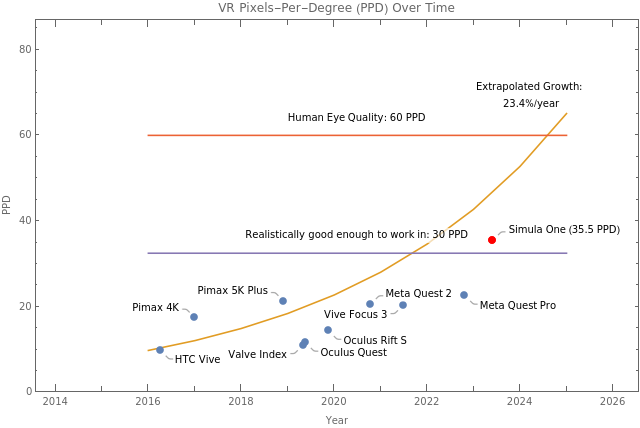
The first thing I tried in VR when I got my Oculus DK1 was was to create a Javascript REPL in VR. I've experimented with many iterations since then and the biggest issue is the resolution of the headset in terms of pixels per degree. This is ~20 on modern headsets compared to the ~60ppd of human eyes. The low res means you need to constrain yourself to ~1024x1024px screens for text.

But if you're willing to use a low res programming environment, the easiest option is to use VNC or RDP for Android and connect to a PC. Alternatively, you can try setting up a Quest + termux + i3 + tmux + vim + ... environment on the Quest for a standalone experience. I haven't tried VSCode on the Quest, but I have notes on how to get a Linux workflow setup at https://www.reddit.com/r/cyberDeck/comments/fc5sfr/oculus_qu...

https://old.reddit.com/r/HMDprogramming/ also has more links on this topic.


Yeah. Most people don't realize that PPD is the single most important metric for viable VR computing. Here's a chart showing the evolution of pixel density over time for various headsets over time: https://www.wolframcloud.com/obj/george.w.singer/business/pn...

In order for VR headsets to truly replace laptops/PCs, they need to be both portable and have extraordinary pixel density. We're working on making portable VR within one doubling of human eye PPD.[1]

[1] https://simulavr.com/blog/ppd-optics/


One headset I’ve heard of that is aimed at more office focused usage is the SimulaVR[1]. However, it’s still a work in progress and you’d have to preorder.

[1]: https://simulavr.com/


Thanks for the shout-out :] It's true the Simula One is a work in progress, but we try to be transparent about our progress in the form of weekly blog updates.

Our headset boards were recently assembled, so we're expecting review units within days or weeks.[1] Our software is also demoable on GitHub for HTC Vive & Valve Index platforms.[2]

[1] https://simulavr.com/blog/first-batch-of-boards/

[2] https://github.com/SimulaVR/Simula


It's hard to really see a significant value add here for work efficiency.

The screen(s) and mouse/kb aren't the current productivity bottleneck for people.


I really would benefit from having a handful of dedicated workshops for specific types of development, and VR seems like a plausible way to fake this.


Large monitors are expensive, they take space, not portable.


We made a post arguing for some of the benefits of VR computers in our weekly update blog.[1]

TLDR: they provide unlimited screens of any size, improve work focus & immersion, are usable outdoors (no laptop glare), improve privacy (no one around you can snoop your screen), and their compact design frees up desk space. They also promote better posture and freedom of movement: with a VR computer you can change positions, sit up, lean back, stand, lie down, or even walk while you compute.

[1] https://simulavr.com/blog/why-vrcs-are-better-than-pcs-and-l...


No. And I sold all the VR devices I had over time rather quickly again. Once the novelty wears off, they just became supremely impractical. For gaming it required the shuffling of furniture. For anything else, neither the resolution nor comfort are there. Even worse if you wear glasses. And in the summer time... think diving goggles, only inverted.


If you do require glasses for VR, for anyone who wants to stick with it, I strongly recommend getting prescription lenses for your headset.

The most common form is just another lens that clips on top of the VR lens so it's not something that will require disassembling your expensive VR headset.

This solves the fogging up problem in my experience, along with light leak from thicker arms on glasses pushing foam covers away, scratches on lens from glass/headset contact and also the fact that I broke a pair of glasses wearing them inside a VR headset.


Alternatively: look into contacts if you want a more general purpose solution.


Fair, I've my own reasons for not wearing contacts


Is anyone actually making those? A Google search doesn’t come up with anything you can buy…


https://vr-lens-lab.com/ is where I got mine.


> For gaming it required the shuffling of furniture.

Depends on the type of game, I play flight sims, elite dangerous, no mans sky and project cars 2 - no need to shuffle furniture with those.


There are actually no quality games that really require you to stand.

I have a dream that we'll see a good quality dungeon crawler I can play coop locally with the kids, that's immersive enough to warrant standing, but I don't see it happening.


Honestly that's true, the closest I've found is PavlovVR which is a lot of fun but it's not an AAA quality game.

That said as someone who loves space/flight and driving games VR is an unalloyed win for me.


Beat Saber?


Haha, no. Half Life Alyx, The Walking Dead: Saints & Sinners, Thrill of the Fight, Beat Saber, Audica, Dance Central VR, Fallout 4 VR, Superhot VR, and so many more.


There is also VTOL VR which is a flight sim/game that uses the VR controllers and put all controls in the VR space so no need to have an HOTAS lying around.

For other sims I have to set up the HOTAS on my desk which leads to a little bit of shuffling around.


I’ve done almost exactly what you bought the Oculus for - results were promising, but not good enough currently.

Reason: resolution is too small. Hard to truly see the code, even when I bought lens inserts that matched my prescription.

I really like using Immersed VR though, it was cool to be able to have 5 different screens. Although, frankly, I’m probably more productive using a generic iMac with no other external monitors.


Its definitely a different experience, but using Immersed was the best. You can set portals to your keyboard and have extra portals as well (like that spot on the table you put your drink).

To help with ergonomics, I would recommend a Halo style strap and a fan facial interface to help with longer sessions. If you were glasses, or computer glasses normally I generally recommend getting the Occulus prescription lens.

I would recommend at least trying it, as mentioned it won't be for everyone, but it is definitely a cool experience. With a bit more innovation at the ergonomics, I can definitely see this being a thing in the future.


There was a guy on HN within the last year who was more or less F/T in VR. He posted about it and answered questions. I'm not sure if either of these are related but fine tuning searches might track them down:

  https://news.ycombinator.com/item?id=28678041
  https://news.ycombinator.com/item?id=29978036


FYI, the person who wrote/were featured in those posts is an HN user: https://news.ycombinator.com/user?id=ptom

Highly recommended reading since this person is basically living 3-10 years into the future and telling us what it's going to be like. :]


Was thinking something similar, but my glasses make it impractical. A company now offers prescription inserts, which I plan to order. https://www.vr-wave.store/products/oculus-quest-prescription...

However, even with my glasses on, the resolution is about 1/4 of what’s needed to perfectly render text. It’s also too heavy, and too hot for more than an hour.

But I’m interested in your experience.


It might be a bit of "faster horse" desire but I'd love to have a VR library if the fidelity was good enough. I mean virtual 1:1 representations of books, that I can make margin notes in etc.

Then when I move I don't have to get rid of a load of books or back up heavy boxes and when I die it can be easily passed on and not a burden to those I leave it to.

Arkady Martine's Teixcalaan series of sci-fi books have this concept of an imago machine, where a person has an implant that allows a compatible "not-quite-sentient" predecessor to live inside their head and give advice. And that predecessor would also have had an imago machine.

It would be neat to have access to the libraries of my ancestors (or anyone I guess) once they become digital and are almost costless to store and duplicate. All the books they read and wanted to read, the notes they made, when in their life they read them etc.


I bought an oculus for vr dev a few years ago but gradually got creeped out by Facebook having cameras in everyone’s homes. VR right now, especially due to oculus, is a surveillance horror story waiting to happen. I sold my headset


I am very interested in this use case since I travel frequently and would love a portable multi-monitor setup. The weight does not bother me and I have watched full movies before in comfort.

2 issues hold it back:

1. Typing and mousing require high res color passthrough cameras or high accuracy low latency hand and keyboard tracking. Neither is there yet.

2. The lenses have too much distortion and not a large enough sweet spot. Fine for gaming, they really don’t cut it when trying to work.

I would happily use a VR headset for a few hours of standing desk time a day if it were just a little more refined. The upcoming Quest Pro might have the needed features to make this a real option.


Why do you need high res color pass through for the keyboard and mouse? I don’t need to see them while working with a monitor so why with VR?


I do kind of need to see them, otherwise I’m going to slam my hands into the desk or knock the mouse off the table. You are effectively blindfolded with the headset on.


I've tried numerous headsets and find the lens distortion / sweet spot to be very annoying. I returned my HP Reverb G2 because I was constantly moving the headset to get the center pin-sharp. If the headset even shifted slightly it was very noticeable. I wish all new headsets would come with a diopter dial so using glasses is a thing of the past.


I tried, but am waiting for a resolution bump to do VR monitor stuff. The screen is large but ends up really low res. Its like working on a 1080p movie screen (or three) from the audience at a movie theater. Its better than working from a laptop screen, but not better than having multiple real-life monitors.

In theory, I should be able to have a laptop and headset and get good multiple monitors wherever I am located.

edit:

I like the separation between VR and irl that a lot of people are complaining about. It makes it hard to multitask between computers and real life, so you have to choose what you are doing instead of pretending to do both.


It's not particularly practical for this at the current oculus display resolution. Sure, there are tools discussed in the thread here with virtual monitors etc, but we'll have to wait for a future generation of hardware for those virtual monitors to have anywhere near the resolution of an actual monitor.


Our tests concluded the same and we gave up for now. Works pretty well while tethered but you have to drop quality for wireless support, and what's the fun wearing one while sitting down? Looking forward for future iterations.


Perhaps a related or unrelated question. What is the easiest Oculus development environment. I want a very simple "hello world" thing. I'm an experienced web/backend developer. I just want 4 avatars in a room who can see each other and talk to each other. I don't care if the avatars are spheres or boxes, just that they can sell "Hello World".

My current best guess is Unity, but perhaps there is something simpler to start with?


VR development is very video-gamey, so tools used for videogame development is used the most: Unity, Unreal Engine, bespoke engines written in C++, Godot, etc.

The default Oculus browser supports WebXR, so if you want a more webby tech stack you can start building using stuff like A-Frame or Mozilla Hubs. Though, be aware that whatever you can run in web-based VR is still pretty much second-class citizen status, with heavy performance/usability restrictions.


Personally I found LÖVR [0] easy to use, based on Lua.

——

[0]: https://lovr.org/


Concurrent user streaming and hello world have a bit of distance between them.


I bought a Quest 2 in hopes of replacing my external monitor with it, but unfortunately the resolution simply isn’t adequate (in my opinion) for traditional, text-heavy desktop computing tasks like writing code. I think the concept has potential, but personally wouldn’t recommend it right now. It is something I do want to try again if/when higher resolution VR headsets come to market.


For fun I did with Horizon Workrooms, and it was quite the mind blowing experience. My laptop's screen was streamed to the headset and looked larger than IRL. I was sitting on my couch in my living room, and noticed an unexpected benefit of VR: no more screen glare from the sun behind me!

VR headsets are not yet a replacement for IRL screens, but I can see that happening one day.


I used a tool called Immersed[1] for a bit. It is neat and potentially useful, as from what I remember you can create more virtual monitors than you have actual monitors, but the novelty wore off and I stopped, since I wasn't particularly more productive.

[1]: https://immersed.com/


>you can create more virtual monitors than you have actual monitors

Only on Windows, but you can trick Immersed on Linux to create virtual monitors for you by using an HDMI dummy dongle


iirc this works on mac too


I have a quest2, I don't think it's anywhere near comfortable enough yet for prolonged use such as development. I've tried watching films in it and even that can get a bit too uncomfortable.

As you say they are still a bit heavy, it's tolerable for an hour of gaming but not work. Now that VR is mainstream I'm sure this will gradually improve, it would be nice to have something almost as light as a pair of glasses or maybe more realistically headphone weight, that would also make it feel a lot more convenient to take on and off without all the head strap paraphernalia. Might be worth revisiting the idea in a decade.


It is far from being a part of work processes. It just needs better material. But, I also suggest playing online FPS games in Quest 2. I think that's the future for FPS games. It promises and somehow delivers a better experience.


No, because I don't want to share my source code or anything I watch with Oculus/Meta. It is worse than a smart TV.


I have used nReal glasses for dev work - they are incredibly light, and are ideal for use outside in situations where a laptop screen would be washed out, or perhaps when travelling, especially if privacy is an issue. The audio is pretty good too, as their intended purpose is really to watch films. Plugs and plays with many, but not all devices. (Hilarious aside: the windows device driver identifies as something similar to 'US Naval research 7" screen'?!). ETA: Can optionally be fitted with spectacle lenses.


How do you find working with them?


No, because the devices are awful at rendering text.


Can it even render people well?


Text needs to be really clearly defined and rapidly updated to accommodate head motion without being blurry. Slight offsets make it unreadable.

Rendering people has a different set of challenges. Skin and hair and eyes have weird textures. Facial animations are difficult to capture. But its more of a solved problem than text.


I've looked around for images of Oculus rendering people, and perhaps I'm not looking in the right places, but so far I couldn't find anything that looks any better than the average window-dressing mannequin. Based on this, I wouldn't call it a solved problem.


It's not solved, but it's just not a particularly VR specific problem, and current tech is pretty good. The oculus doesn't have top of the line graphics capabilities and games tend not to go for photorealistic people. We can handcraft moments to jump outside the uncanny valley imo. We cannot do it dynamically at run time in a game. We can do a good enough job that I don't think it should matter and VR will catch up. It likely will not be good enough to mimic intimate facial movements. So... you know it's a goal setting problem mostly.

To a large extent we could make some photorealistic humans in VR, under some definitions, but we don't.


I bought one of these to use Immersed[0]. The software was fine, but the display was too blurry outside of a small area in the center, so I couldn't really use it.

0: https://immesed.com/


I've done it some and it shows promise but for me personally the tech is at the progressing-but-not-quite-there-yet stage.

Regarding weight: the headsets do need to become lighter, but right now the larger issue is the imbalance of the weight. If you attach an external battery on the back of the head strap*, it will greatly reduce neck strain from prolonged usage, and overall it actually feels lighter.

* BTW, for the Quest 2 specifically you should look around for a 3rd party replacement head strap because they can provide a better fit. Search for "bobovr" on Amazon to see the one I got.


Been thinking about this since the 1990's VR headsets

http://videogamekraken.com/cybermaxx-by-victormaxx


Why would you buy a display device that requires registration?

As a consumer, you have to enforce limits and stop buying consumer goods that are against your best interest.

You deserve what you tolerate, and if you buy a product that you don't own, and you get mistakenly locked out of your account and end up with a bricked product, then you deserve it.

What's next? Food packaging that requires registration? If I am buying a product then I am the owner. Private property as a right must be protected.


Personal property must be protected. Private ownership of the means of production can go fuck itself.


That's marxism. A rebranded form of slavery where the entire population are slaves to to a totalitarian government.


I’m waiting for Project Cambria, aka Quest Pro, to do these kinds of experiments. It will be lighter with its pancake lenses and the color mixed reality cameras should make it more seamless to use my real keyboard and mouse. As you mentioned the Quest 2 is just too heavy for this kind of work, but I have high hopes for the Quest Pro (and perhaps Apples rumored headset for announcement in January 2023) to enable coding and work scenarios.


Check the subreddit /r/HMDprogramming


Yeah I can't keep it on for more than an hour. Otherwise I start getting headaches and feeling nauseous.


For gaming, I initially had motion sickness and headaches, but after a few months of use they went away entirely. But I imagine it’s different for everyone.


I haven't used it in the way you're describing but this might be a good place to start.

https://www.oculus.com/experiences/quest/2017050365004772/


It's pretty easy, blender to design with, export to unity add your sdk (android will be one of them considering quest 2 is android 10 and quest 1 is android 8) Unity is C# and can export to Visual Studio. That should give ya your design engine right there.


Yes and I would strongly recommend not doing this. The display resolution is too low and the motion blur, VAC, and other idiosyncratic VR problems all mean that you will most likely get a nasty headache. I would recommend buying another monitor instead.


I am in a similar boat. Thought it could be interesting to code in VR but the clunkiness of the whole setup (keyboard pass-through is limited) and the text resolution have held me back from trying and real work on my quest 2.


We're making an office-dedicated headset with extremely high pixel density and AR passthrough to solve both of these issues.[1]

[1] https://simulavr.com


I have this idea for a chorded VR keyboard that's modeled after a drum kit or xylophone.

I predict that once you learn the chords enough with muscle memory, you'll be able to take off the headset and just type with the hand wands.


Have you heard of Twiddler? It's a one-handed chorded keyboard which people have managed to get up ~60wpm (IIRC) typing speeds.[1] It might be potentially useful when computing in VR.

There's also someone I met recently who is working on a VR keyboard (though it's not chorded).[2] Seems like an elegant design.

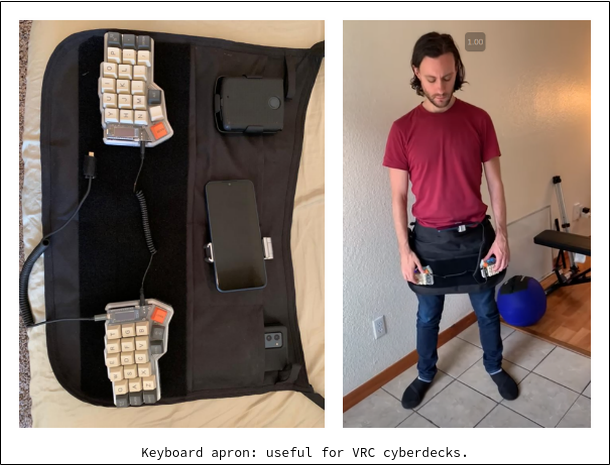
Earlier, I also made an apron keyboard specifically for VR usage.[3] It's cool but arguably more invasive than these other designs.

[1] https://twiddler.tekgear.com/

[2] http://solatido.com

[3] https://www.wolframcloud.com/obj/george.w.singer/business/pn...


How does this reconcile with the other comments saying that the Oculus resolution isn't high enough?


I tried it a few times with an Oculus 1 and 2. The lower resolution isn’t terrible. You can zoom to a level where the size of text is quite readable. But that’s the trade off. Nearly infinite screen sizes, but zoomed in to make it legible.


Immersed vr is a good app, but quest 2 can be unbearable after 15 ~ 20 mins in a seated sedintary position.


Guidelines | FAQ | Lists | API | Security | Legal | Apply to YC | Contact

Search: