Great app, thank you for the recommendation. There's only one problem I've encountered so far. I use `maim -s` to take screenshots, and I've tried to combine it with the dragging mode in warpd, but it doesn't work. As soon as I activate warpd, maim seems to exit. Or if I enter warpd first, I can't launch maim anymore. It would be nice to take screenshots from keyboard only. Otherwise, warpd is awesome. History mode is interesting in particular.
And, if you're interested in some historical context for this "type characters and jump to point" functionality, the Canon Cat: https://youtu.be/o_TlE_U_X3c
Shortcat is my favorite of these sorts of apps. I just wish there was a way to make all of them faster. The delay between requesting the link hints and then actually displaying on screen is painful enough that I haven’t been able to incorporate it into my workflow.
Most of these apps seem to tie into MacOS’s accessibility framework for the hinting, and I’m guessing the delay is being caused by waiting for and then acting on these response from that framework.
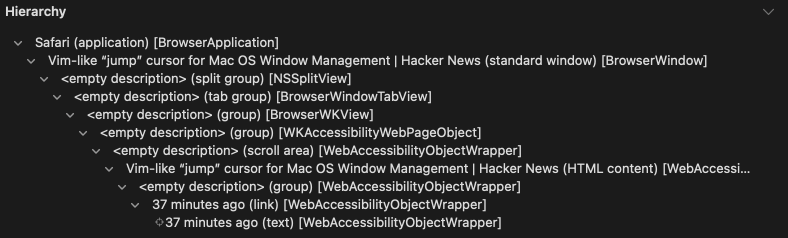
The app in the screencast is Firefox; if you run Accessibility Inspector.app and try to inspect, for instance, the "NN minutes ago" link text in your comment, this is what it looks like in Firefox [0] and this is what it looks like in Safari [1].
Firefox (and Chrome) look like giant completely opaque windows to the macOS accessibility API, the only things you can "see" to click on are the close/minimize/maximize buttons, whereas Safari exposes its entire interface and a lot of the web page to the API.
It looks like Homerow is somehow scraping a short list of apps, "Popular non-native apps such as Chrome, Firefox, Brave, Arc, Visual Studio Code, Spotify, Slack, Discord, and Obsidian are supported. I'm working on supporting more non-native apps.". I don't know how shortcat etc do it, but all of these approaches might just be slower than using the accessibility API.
I've been looking for a utility that will let me look at a window on another monitor, see a hint, focus it. It seems as though this utility only works within windows rather than between them though, if I have understood the sales pitch correctly.
I'm coming to MacOS from a Linux tiling WM. I'm so used to being able to jump between monitors and switch windows directionally without having to grab the mouse.
Alt-tab / window search workflows are a non-starter: I can see the window I want to focus, I shouldn't have to pick it out of a menu or have to type the window title.
Does anyone know of any utilities that might fit the bill?
I also came from a TWM (i3) to macOS. It took a while to get to a good solution but I have it down now with yabai and skhd for window management. For launching apps, I wrote something around the launchAppOrFocus API in hammerspoon, assigning hot keys to my commonly used apps. I also have a rule set in yabai that launches certain apps in set desktop spaces.
I use spotlight search for the apps I don’t open so frequently but having something closer to dmenu (or a fuzzy find app picker) would be nice.
not exactly what you want but I use alfred hotkeys tied to "open" actions for specific applications. If the app is already open it activates it instead so I have shortcuts for safari, firefox, slack etc.
I’d love to use an app like this but I’ve tried a few and they are too slow for me and they only work about 90-95% of the time which is enough to start relying on it but when it doesn’t work it’s jarring and then I have to use the mouse, which makes the entire interaction slower than just using the mouse in the first place.
I feel like $29 for "use it forever" is pretty reasonable for something that would likely qualify as a "game changer". How many sales would they have to make at say $5 to pay for all the time they spent developing it + all the time they will spend maintaining it as apple changes things out from under them?
If we assume a $5 price, and a standard US contract rate of ~$100hr (cheap for US contracting actually) and we ignore the cut taken by credit card companies and such (ha!), then we're talking 20 sales to pay for 1hr of development. I don't think they made this plus the site with < 20 hrs and I assume they'll be spending at least 1hr doing email support so 400 sales just to cover their time making it. Or 420 sales to break even... for an extremely niche product.
It's a bit surprising how consistently the amount of work that goes into developing an app and then maintaining it is underestimated, particularly with how there doesn't seem to be any price point other than free that won't prompt reactions of "that's too expensive". As someone who's more inclined towards developing little desktop utilities than some kind of SaaS it's dissuading.
For clarity $29 is "use it forever" but with updates for only 1 year. If only for security patches, best to keep software updated, so for most it becomes $29 annually.
Also:
> you can use Homerow without a license. An unintrusive prompt will show every 50 activations.
for many apps recently, the pay $$ "use X forever" has evolved to mean "pay $$ for version X and use it forever", then bring a new paid version of X every year or so.
I'm all for monetising projects - just can't see a one-off $29 making them much, it's a niche product (as you say).
If you haven't used leap or its alternatives in vim, I highly recommend giving it a try. It's the closest thing to a direct brain to computer interface that I've used. Love the other comments in here. I'll have to check out shortcat.
Cool app; does it use the same MacOS api as the Voice Control feature? (If you’re in voice control and ask for it to “Show Number”, it will append a number to every clickable element currently in view
anyone aware of a quick switcher like this but for open windows/tabs on Mac? AltTab which seems to be the popular options doesn't seem to have a quick switch/fuzzy finder.
This is off-topic because this thing is about cmd-tab switching instead of typing a couple keys to switch to a particular window, but I just wanted to second the mention for hammerspoon as a "can probably solve your issues with macOS interface" multitool. Since you write in lua (or anything that compiles to lua, like fennel) it's incredibly easy to iterate on.
By Finder do you mean Spotlight? My gripe with Spotlight is the instability of the pre-selected item after you type a few characters.
On my mac, if I'm trying to go to Finder, I get
  cmd+space  (Spotlight Search)
  f          F(inder.app)
  i          Fi(nd My.app)
  n          Fin(d My.app)
  d          Find( My.app)
  e          Finde(r.app)
so quite often I'll see Finder.app show up as the result, but I've already told my fingers to type the 'ind', so there's a race between "type these keys", "see Finder", "type return", and "see Find My".



This is Vimac that gone commercial
https://github.com/dexterleng/vimac