>"Windows 3.1 in my BIOS? It's more likely than you think".
That is a pretty misleading title to me, it sounds like they discovered many bios's have embedded windows 3.1 to run the user interface.
Instead its about someone purposefully loading windows 3.1 onto their bios flash chip, and how they made it functional. "How i embedded windows 3.1 into my bios" or something would be a more descriptive title.
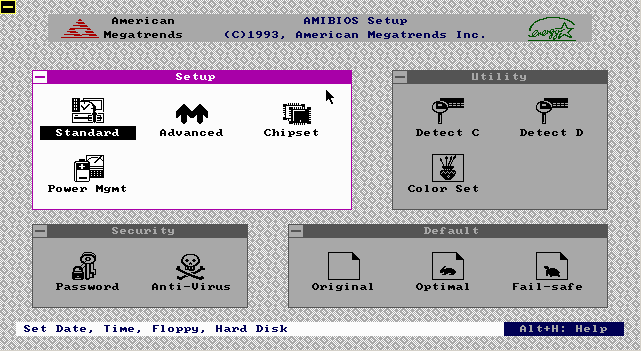
I seem to remember that Compaq business PCs in the late 1990s/early 00s had BIOS/NVRAM setup that looked suspiciously like a customized build of Windows 3.1. You held ESC or something during boot and you got a mouse-driven interface to set various hardware settings. I remember it being quite the contrast to the more common text-mode menu based BIOS setups.
I never looked into it whether it was actually in ROM/Flash or whether it booted off a special disk partition.
Here are some screenshots I found that kind of match what I remember:
This is just made to look like Windows 3.1 at a glance but there are many small details that are different from real Windows 3.1 (or even 3.0). For example Windows 3.x do not have a 3D shaded button at the top left corner of windows, instead they have a flat button/square with a thin "-"-like rectangle that has a black outline, white filling and single pixel shadow, like a three pixel tall popup menu (which is intentional since in Win3.x this was supposed to be the icon for applications to use if they wanted to have a dedicated control/widget for showing a popup menu).
Similarly, the mouse cursor's triangular part is smaller, the window corners are missing the "connecting" corner lines, the font is different (in Win3.1 all fonts are bold and the space is narrower), the button shadow color is too dark (this was the case for EGA in Win3.x but this is VGA and in VGA the palette was modified to have a less contrasting shade for the bevel colors), the dialog box (from the first image in the three, not linked in your message) uses the resizeable (but corner lines still missing) border style instead of the dialog box style (which is blue with a white inner line), etc. I'm sure i can find more differences if i spend more time on this and look at Win3.x screenshots, but these are from memory and i think you get the idea :-P.
Sadly, I can't view your images on my device, but I have a '96 Presario that's fairly close in vintage; it has what I presume you are describing. The program resides on a hidden DOS partition on the HDD. While novel, it's a bit unfortunate, as there's no configuration program in ROM, so without that partition (or the multi-disk floppy set) you can't configure the CMOS settings.
Yet, the BIOSes both of the last motherboards i bought (one recently, another 3-4 years ago) had some very elaborate UIs, with skinned menus, star backgrounds and a bunch of other frivolous stuff. I think one even had some sort of background ambient sound.
Keeping with tradition though, the "help" screens of every option was as helpful as the "help" screens of my 386DX, Pentium MMX and Athlon64 desktops of decades prior, with entries such as the help for "Select frobation mode: FOO" being oneliners such as "Frobation mode, can be FOO or BARF" (but what the hell does frobation mode do and what do the FOO and BARF options mean?).
I think I still have somewhere a pile of paper booklets that came with old motherboards that have similarly unhelpful descriptions of various settings.
I know criticising submission titles is a meme on here but it would be nice if the top comment on a pretty interesting hack was about that pretty interesting hack.
Going on topic for a moment. I love the concept behind this project. I wonder if you could fit Linux + busybox on there (I haven't run the numbers but I'd expect it wouldn't be possible)
> I've tried changing the fifth case to 2 heads, 80 tracks and 72 sectors... But it resulted in an I/O Error.
This happens because the BIOS (int 13) CHS read function encodes the sector number as a 6-bit value. (IIRC it's also 1-indexed, just to add insult to injury.) If you change the geometry to 2head/80[+]track/60sector, it works on everything I had on hand for testing half a decade ago.
+: Or more; it should work with up to 1024 tracks.
Regarding the audio: I don't know about that specific model but I believe it uses standard Intel HD Audio (Azalia) --- and someone has written an HDA driver for Win3.x that goes by the name of "HDADRV9J" (complete with source code, albeit somewhat messy, in Pascal):
(This stuff is notoriously difficult to find. I only found out about HDADRV9J from Google a few months back, and there were quite a few sites about it, now there's almost no results...)
DOS is still surprisingly usable in the modern world with a little work. That isn't super surprising though given how simple a system it is and how ubiquitous it was in the relatively recent past.
That's Windows 3.1? It has the window borders of 3.1 (the weird "—" in the upper left, the white menu bar) but we've got "My Computer" and "Recycle Bin" on the desktop — desktop icons weren't introduced until Windows 95. There were icons in 3.1, but they were minimized programs, since there was so start bar at the time. (But, his video and one screenshot also have a start bar in them?)
Windows 3.x had at least one third-party extension that gave it a bit of the Windows 9x look and feel, including task bar, start menu, and desktop icons.
It says he's using Calmira, to make it look like windows 95. You can see that the padding on the start button and status bar are a bit off, if you look closely. (Also of course the minimize/maximize buttons on the applications are unchanged.)
Back in the late 90s the 1.44 MB QNX demo disk was quite a thing; it shouldn't be too hard to have it run from a BIOS flash.
Found it here as I couldn't find a link on QNX site.
https://winworldpc.com/product/qnx/144mb-demo
I get the retro chic of an old Windows OS, but you could also package a window manager, web browser, text editor, and more in a floppy disk into the late 2000s using Linux. Compared to the multiple gigs of OS files needed to run Android on my smartphone, it's almost inconceivable how wasteful modern software is.
MS Windows of some 3.x variety was apparently the original selected GUI for the Atari ST, intended to be running from ROM… however, MS couldn’t apparently get it to fit in less than a couple of megabytes, hex dumps of the code would show a hell of a lot of redundant x86 stuff in there, like references to hercules drivers and all manner of bloat that they couldn’t strip. They seemed to be disassembling the binaries to translate to 680×0 assembly and kludging it that way rather than from source, which was always rumoured to be a complete mess for the early windows versions. Anyhoo, apparently Trammiel got pissed at MS for lack of progress on shrinking and refining it and went with a version of GEM instead.
Windows 3.0 came out in 1990, whereas the Atari ST came out in 1985, so that story definitely doesn’t check out. Windows 1.0 came out in 1985 (though still much later than the ST) so maybe it was that?
I just wanted to add that the TOS ROM chips in the Atari ST were 192KB in total which is an order of magnitude less than what Windows would require. I'm assuming GP is thinking of another machine (maybe the TT / Falcon?)
Not the OP but I wonder if he's thinking of Windows 1.0? Wikipedia does describe Microsoft approaching Tramiel[1] but the details differ from what the OP suggested.
That's not too surprising. Early MacOS didn't provide much more than MS-DOS under the hood (non-hierarchical file system, manual multitasking), and the graphics were all 1bpp.
I didn't realise it didn't have a proper file system. Games were more glorified as far as user interface was concerned, e.g. the 2000 planet system with 3D graphics of the BBC Micro's Elite, running on an 8 bit 6502 machine with 32K usable RAM.
You can see the Mac OS as an expensive 'game' with the objective to write a letter, running on dedicated hardware.
Don't know about the 486 specifically, but this sort of thing wasn't unheard of. I have a pentium-era machine with 8MB EDO built into the board. It can stand alone or complement whatever you put in your DRAM slots (though curiously, if you max it out at 4x32MB, you get 128MB, not the 136MB you might hope for...)
Edit: wait... I thought we were talking about something unusual because he mentioned SIMMs, and the 486 specifically, but I guess he's just talking about the conventional memory on x86 that peaked at 640KB. This is not what I was describing above (that system has extended EDO built in in addition to the conventional 640).
Don't have a specific link for you, but just look into the memory model of the IBM PC, conventional vs extended RAM, etc... 640KB (or less!) was all we used to have, plugged right into DIP sockets.
When, in the late 80s, computing technology started increasing in power like mad, we quickly needed access to more RAM, but the original memory model held us back, so we had to hack around it in various awkward ways. So we ended up with the original on-board chips + SIMM expansion slots.
Looking back, we were so terribly shortsighted in our designs, and Moore's Law just continually blew everything to hell.
That's not what this is about. OP is talking about booting with just the external L2 cache (which I've seen vary from 64KB to 256KB) when no RAM SIMMs are plugged in.
So the cache can stand in for main memory when none was present? I'd be interested to see the implementation details, but alas, I must be going about my search wrong =(
Will have to look into it more when I have some more time.
Parent specified a board with SIMM sockets, which would contain main memory. The 486 family supported external L2 cache, for which 64KB would be a plausible size.
Did SIMM RAM straight up replace the DIP chips when it was introduced? For some reason I thought they were used in parallel, with conventional RAM physically separate from the rest. I guess there's no reason that should have to be, though, as the 640K barrier was a real mode limitation, and nothing more. What they say about assumptions applies.
I guess I kind of missed out on the fun here, going straight from an XT to a Pentium...


That is a pretty misleading title to me, it sounds like they discovered many bios's have embedded windows 3.1 to run the user interface.
Instead its about someone purposefully loading windows 3.1 onto their bios flash chip, and how they made it functional. "How i embedded windows 3.1 into my bios" or something would be a more descriptive title.
edit: Or even "Windows 3.1 Flash edition", as the original page & hn post have, https://news.ycombinator.com/item?id=19630502