Hacker Newsnew | past | comments | ask | show | jobs | submit | more yehoshuapw's commentslogin

that is very fun to play with, thanks!

it took a bunch of tries to get it to do what I wanted, but https://neat-otter-bj288v.manyminiapps.com a crochet spiral counter helper https://calm-puma-bqqdmr.manyminiapps.com - a falling sand game

I'm quite impressed


without access - how do you know the files are temp files?


I used to delete them on old Android version.


it took a while to get it to work well, but I use yubikey here, and recommend it. I do need to find and pulg it in sometimes, but overall might leave it plugged in. and I have it configured to require a touch for every operation


for phones, have a look at thumbkey https://github.com/dessalines/thumb-key (messagease like)

I also recommend dactly (see also https://ryanis.cool/cosmos/ for a more generic keyboard generation)


what you get out of it, depends on what you put into it


while this does bring up a valid point,

"classic" sql databases are still safer for many things then mongodb.

it is easier to do away with types and constraints, but in many cases they do end up being important safeguards


The same abstract pattern exists with many (most?) annoying things in the computing field: people focus on solving problem #1 but it turns out there's a complementary problem #2 that is now worse, that they either didn't know about or didn't much care about.


I see you wrote you used PETG - would you recommend it, or would you have done it again in PLA?

(due to accuracy.)


It worked fine, no regrets. It's more stable for outdoor use, so that is why I went with it. I've printed exclusively with PETG.


I actually assumed that this is because the system tries to figure out where you will be by your planned route. so seeing the bike coming up is much later - for example when the bike will be coming around a corner


I think they already work in blender

(there even is https://www.printables.com/model/908684-spacemouse-mini-slim... - which I know works in freecad)


I ended up in gentoo mostly just to avoid systemd

(used it before, mostly to learn. went to debian for new laptop. gave up after fighting systemd. I'm aware of devuan and artix, but gentoo just worked (after all the time spent))


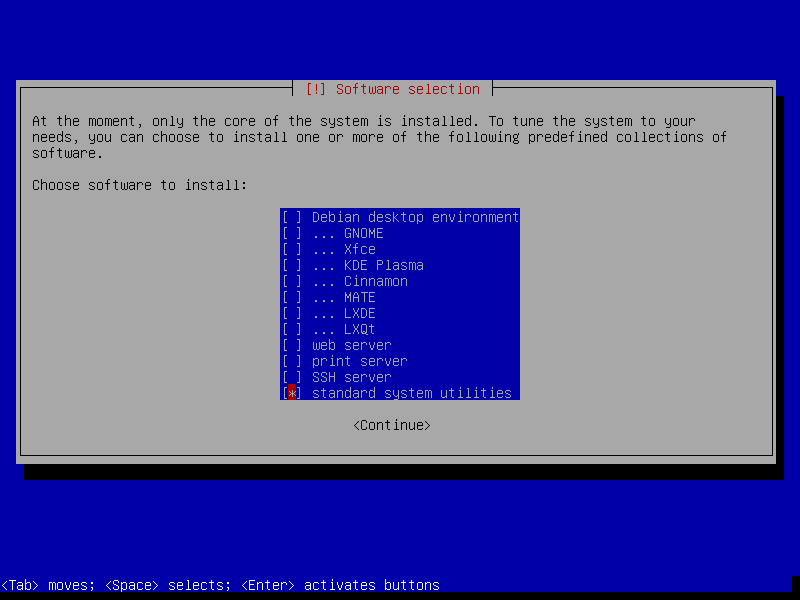
Debian, at least until bookworm works perfectly without systemd. The easiest way to make this transition, is to installed Debian with nothing but 'standard system utilities' and 'SSH server' (if you want) during install:

https://forum.qubes-os.org/uploads/db3820/original/2X/c/c774...

Once install is done, login and save this file:

  /etc/apt/preferences.d/systemd

  # this is the only systemd package that is required, so we up its priority first...
  Package: libsystemd0
  Pin: release bookworm
  Pin-Priority: 700
  /etc/apt/preferences.d/systemd

  # exclude the rest
  Package: systemd
  Pin: release *
  Pin-Priority: -1

  Package: *systemd*
  Pin: release *
  Pin-Priority: -1

  Package: systemd:i386
  Pin: release *
  Pin-Priority: -1

  Package: systemd:amd64
  Pin: release *
  Pin-Priority: -1

After:

  apt-get install sysvinit sysvinit-core sysvinit-utils
Reboot then:

  apt-get purge systemd

There are a few edge cases, packages which require systemd, but I've been running thousands of systems including desktops this way for a decade.

Yes, I also run thousands of systems with systemd too.


Have you looked at Devuan? Genuinely a good experience.


It's important to remember that it has to be this aggressive in excluding systemd, too. There is quite a lot of strong coupling amongst the parts of systemd, so there are very few half-measure scenarios, where one can have only some systemd stuff, that will actually function correctly in toto.

Moreover, there are the odd one or two unrelated packages that just happen to have the string "systemd" in their names. (-:


Note that this will still allow systemd-udevd because it's packaged under its original name, udev.


yeah. you need eudev instead. still, I appreciate the guide!


MX Linux for the win. Debian based, but defaults to 'init'. Booting with systemd is an option. Just enough systemd-* running to make things easy and seamless.

  $ ps agxf|grep 'systemd'
      607 ?        S      0:00 /lib/systemd/systemd-udevd
     2201 ?        S      0:00 /sbin/cgmanager --daemon -m name=systemd
     2726 ?        S      0:00 /lib/systemd/systemd-logind
 
Also can install Nvidia or AMD video drivers.


Guidelines | FAQ | Lists | API | Security | Legal | Apply to YC | Contact

Search: