I get the point they're making but I really like FAQ's. They help with the "know what you don't know" sort of thing at a glance. Perhaps not useful on a gov.uk site, but generally speaking.
I don't understand why people can't simply say "we don't want to do X because of this and that", they have to necessarily say "I don't want to do X, so X is bullshit and nobody else should do it either".
I personally think it's a big improvement over what it was before -- on macOS at least. On macOS, Firefox had always felt a little bit off. Nothing too egregious, but just enough to make it slightly unpleasant (like the non-native context menus). I feel like that has been resolved in this update.
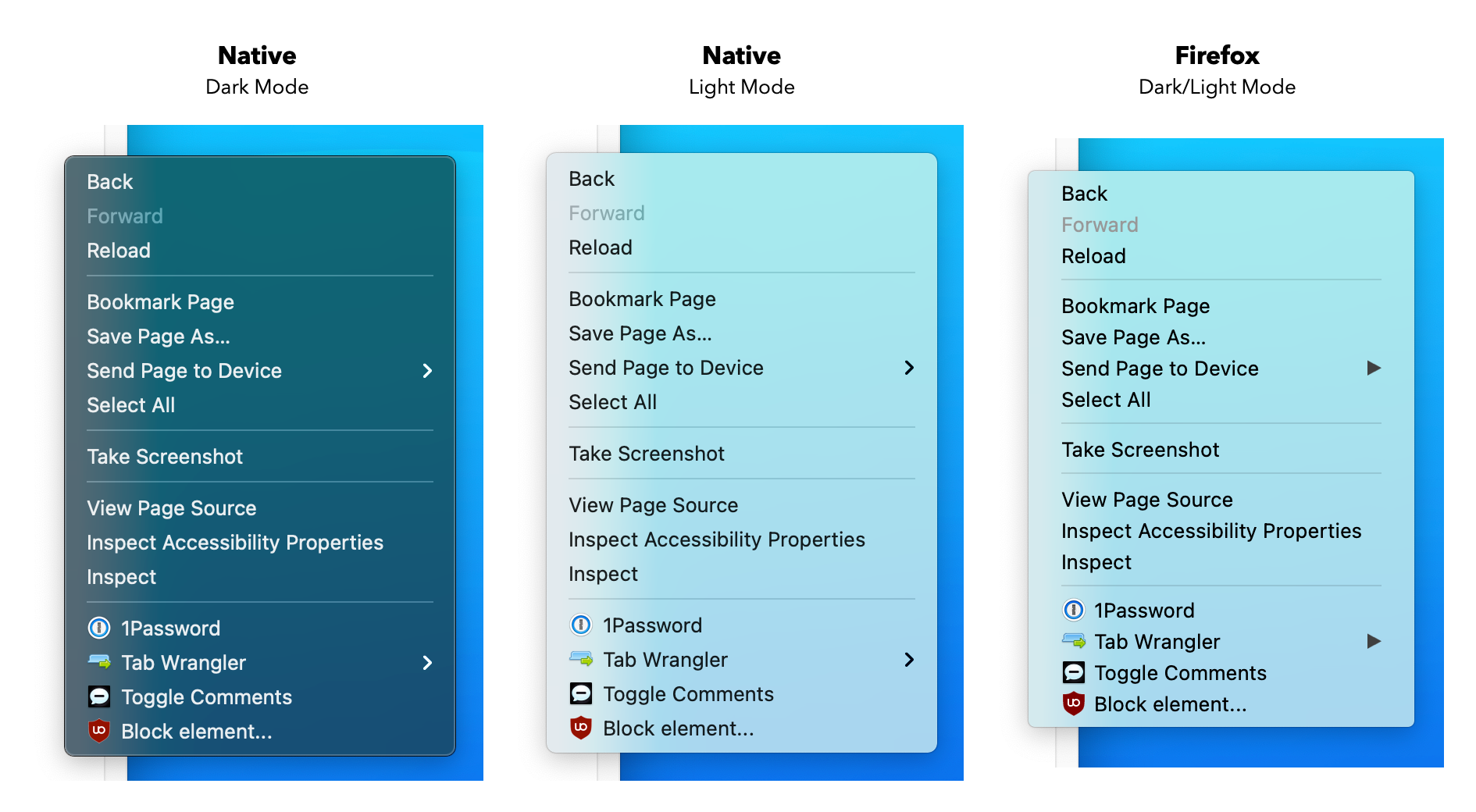
Since you've already mentioned it - I hear that Firefox has non-native context menus all the time, but for the life of me couldn't tell any difference between "native" and "non-native" context menus. Anybody has any proof/example of this?
It looks close, but details and behavior are a bit off. For example:
- Firefox context menu does not respect system's dark mode
- Different horizontal and vertical margins between items
- Different font rendering (e.g. text looks bolder)
- Different right caret icon
For behavior difference, for example: when navigating sub-menu items, macOS uses cursor velocity and cursor direction to determine if user is trying to go to submenu and immediately dismiss it if user is not. Firefox context menu uses a delay to archive similar effect. (To test this: open a sub-menu in a context menu, then move the cursor up. macOS native menu dismiss immediately, where old Firefox has a small delay before it is dismissed.)
And on Big Sur, the old Firefox menus were still using edge-to-edge rectangular selection but the system ones now use rounded-rectangles that appear to detach from the edges.
Try streaming a call on MacOS... you'll feel a bit off.
40x the energy usage vs Safari. It's atrocious. Laptop gets to silly high temps, has to be bad for battery life... But I'm sure glad we have some new popup confirmation windows. Cool.
EDIT: I use FF on my Mac as my primary browser. Just so frustrated at how little fucks they give about performance and battery usage.
BUT, I really do like Firefox's ability to clear history and cookies on close. I like the extensions for Firefox... Safari doesn't really have any extensions... not really anyway. Things work funky, if they work at all. I think I run 40+ Firefox extensions for work.
Everything from ClearURLs, to Wappalizer, to Reddit Shine. Nothing works on Safari.
Firefox is great, except they don't give a flying poo about battery life or heat issues on Macs. Really frustrating given we're all mobile these days.
To be honest, Microsoft has given up trying on Windows as well. Every Microsoft application feels different and MS Teams even ignores the Windows notification infrastructure.
This is actually amazing! Completely changes the feel of the browser. It makes much more of a difference than I imagined it would. It feels so so much better on Mac.
On macOS I use Keyboard Maestro[1] with a "Type String" macro[2]. Pops up an input[3] and then types the string you enter after a delay. One of many time-saving uses for KM!
Does anyone know if you can disable email on GSuite (i.e. change MX on my domain to Fastmail), but keep the rest? I use my GSuite account login on a lot of sites, I've got shared photo albums etc.
I think it's hard to get a feel for how it would look in practice from those short examples.
Library code might be a little ugly and abstract, but as an end-developer, you usually don't need to worry about it. The code you yourself would see and write is going to have a lot more meaning and be more understandable.
I've rarely had to do anything fancy with generics in my own projects. Where I've seen it be most useful is when I want to offer a flexible public API -- in which case, the choice of writing a bit of generic library code is much less smelly than copy pasta.